Ramble on camera. Post like you rehearsed.
Turn your raw take into a vertical reel. Cut the pauses, add captions and bring your brand on screen. Then chat with the AI director, comment on a moment, or fine-tune the edit yourself.
3 free reels · No card needed
A real English reel and excerpts from its director conversation. Play it, scrub the timeline, or turn the sound on.
- Made for the videos you already film:
- Product demos
- Quick tips
- Founder updates
- Explainers
- Behind the scenes
- Launch day
Before and after
Same take. Your direction.
The original English recording and its Reelify export. Turn the sound on, pause, or scrub to compare.
- The original English take
- Real pauses and the restart
- No captions or product scenes
- Retakes and long pauses cut
- English captions and product scenes
- AI direction, then hands-on refinement
- Still editable through export
One founder’s real take, refined with the AI director and manual controls. Durations describe these files, not processing time.
The full founder demo
Watch the take become a reel.
The pauses are real. So is the restart. Then the edited Reelify video takes over, with captions, product scenes and the editor on screen.
84 seconds, in English. The opening keeps the original pauses; the rest shows the actual Reelify export. The raw intro and editor screenshot were assembled into this launch film separately.
Make a reel from your own take →The bottleneck
Filming takes five minutes. The edit eats your evening.
Cutting retakes, timing captions and making every video look like yours is the part that stops people posting. That’s the part we take off your plate.
Doing it yourself
- 01Scrub through four minutes to find the good takes
- 02Type out and time every caption by hand
- 03Rebuild your title card in another app
- 04Export, spot a typo, export again
With Reelify
- Upload the take, retakes and all
- Get a cut, captioned reel in your brand back
- Ask for changes in plain words
- Download the MP4 and post it
How it works
Three steps. One of them is pressing record.
- 01
Record and upload
Talk to your phone like you’re explaining it to a friend. Flub a line? Say it again and keep going. Upload the file as it is.
- 02
Get a first cut
Retakes, false starts and long pauses come out. Captions go on word by word, and the 9:16 frame stays on you.
- 03
Shape and export
Ask the director for feedback, comment on a moment, or adjust the timeline by hand. Review the result, then download the MP4 when it feels like yours.
The director and the editor
Tell it what to change. Keep shaping the edit.
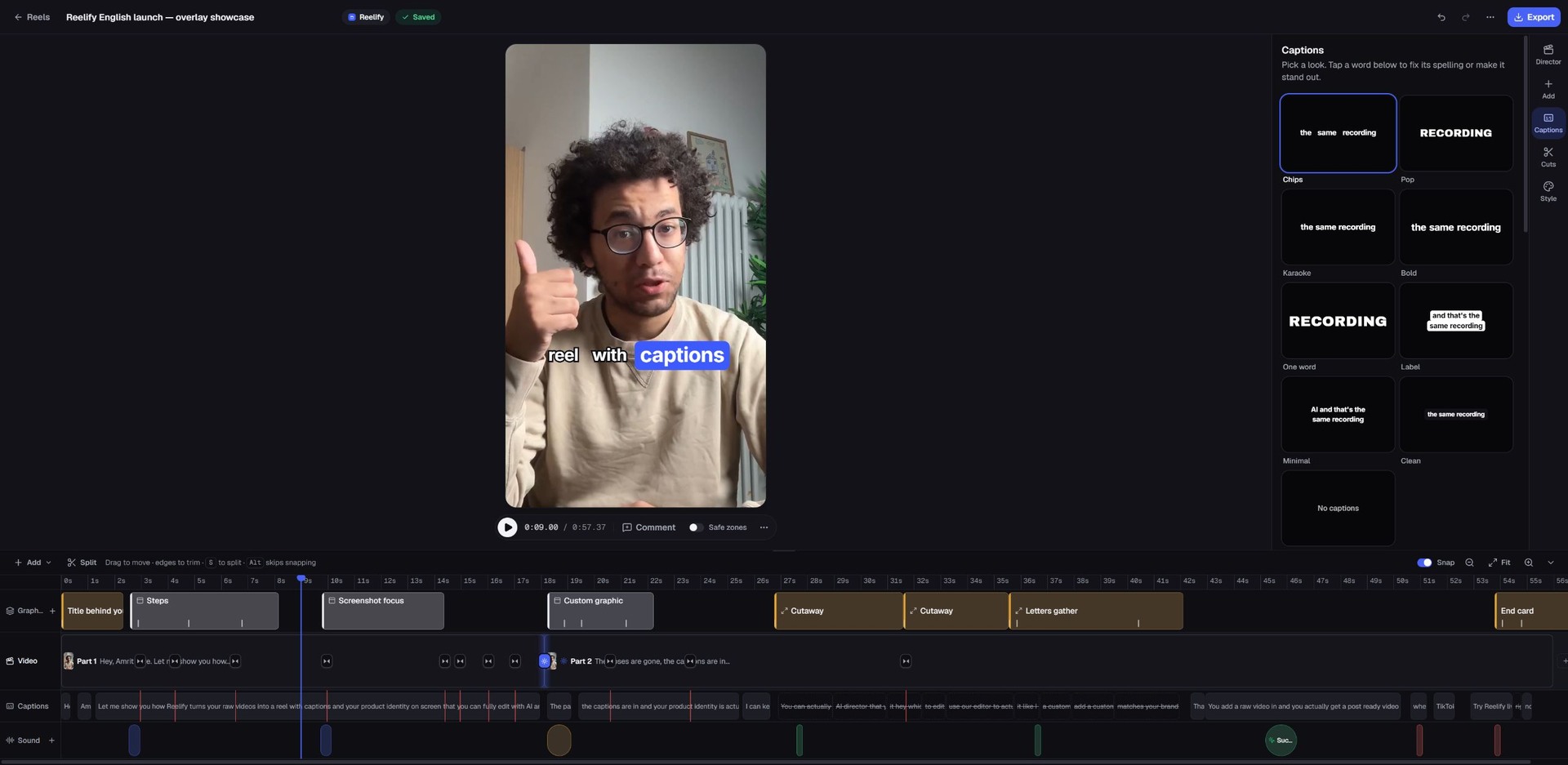
Ask the AI director for feedback or give it a specific direction. Comment on a moment, then fine-tune captions, cuts, graphics and timing with the editor's controls.
Excerpts from this English reel's real conversation
A restrained Reelify title behind me and a small animated raw-take → reel motif could work. Use the words I actually say.
Added the title behind you at 0.0 s.
Features
From the first cut to your final call.
AI direction and the controls to make the edit your own.
Scenes timed to what you say
Your screenshots, photos and clips show up on the words that name them.
A cleaner first cut
Cut repeated lines, false starts and long pauses, then review and refine the pacing.
Captions on every word
Each word lights up as you say it, so people follow along with the sound off.
Your brand on every scene
Save your logo, colors, product shots and music once. Title cards and end cards use them every time.
Keep shaping it
Chat with the director, comment on a moment, or fine-tune captions, cuts, graphics and timing yourself.
- 1080 × 1920 MP4
- No watermark, on any plan
- Post it anywhere
- Your videos are private to your account. We never sell them or use them to train AI. Privacy
Pricing
Priced by how often you post
Start with 3 free reels, no card needed. One credit makes one reel.
Free
Try it on your own videos
$0no card needed
Start free3 reels to start
- All features included
- Edits and exports included
Starter
For a couple of reels a week
$9/monthbilled $108 yearly
Start with Starter15 reels a month · $0.60 a reel
- Captions on every word
- Brand kits
- Edits and exports included
- Most popular
Pro
For posting most days
$22/monthbilled $264 yearly
Start with Pro50 reels a month · $0.44 a reel
- Everything in Starter
- Priority processing
Business
For brands and agencies
$44/monthbilled $528 yearly
Start with Business150 reels a month · $0.29 a reel
- Everything in Pro
- The lowest price per reel
Every plan: all features, edits and exports included, no watermark.
FAQ
Questions, answered
Plans, top-ups and what uses credits are on the pricing page.
Your next reel is already in your camera roll.
Upload it and see it finished.
Make your first reel3 free reels · No card needed